
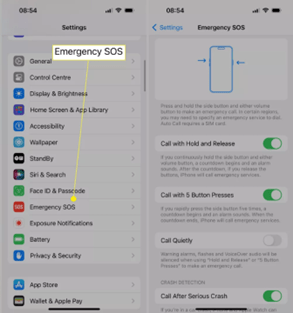
Turning off Emergency SOS on the iPhone 15 is a simple process, as long as you know where to look.
Follow these steps to turn off SOS on your iPhone 15:
- On your iPhone, open "Settings".
- Select "Emergency SOS".
- Turn off "Call with Hold and Release", "Call with 5 Button Presses" and "Call After Serious Crash" to disable Emergency SOS.

How to Turn Off SOS on an iPhone 15 When It Gets Stuck
You may find that once SOS mode is activated, it is difficult to turn off. Fortunately, turning it off is usually fairly straightforward, and the issue is often caused by network signal problems or simply a glitch.
Here are a few ways to turn off SOS mode on your iPhone:
- Use aeroplane mode. Turn aeroplane mode on and off again to reset the connection. Swipe down from the top to open Control Centre, then tap the aeroplane icon twice.
- Turn off mobile data. Turn mobile data off and on again to reset the connection. To do this, swipe down from the top to open Control Centre and tap the antenna icon twice.
- Restart your phone. Restarting your phone is a tried-and-tested solution to many problems, so try turning it off and on again. This often fixes many common issues.
- Contact Apple Support. If your phone will not exit SOS mode, there may be a problem with the device. It is time to contact Apple Support, who can help you further.
Reasons to Turn Off SOS
SOS is a useful feature, but sometimes it is better and safer for you to turn it off.
Here are a few reasons why you might want to turn it off occasionally:
- False alarms caused by children. A series of quick button presses will activate SOS, and you certainly do not want that to happen. Turn off the setting to avoid these situations.
- Tight pockets. It may sound strange, but if you put your iPhone in a tight pocket, it can be easy to activate Emergency SOS as you walk, sit or stand.
- You are doing something potentially dangerous. Riding the dodgems at a funfair? This could confuse your iPhone into thinking an accident has happened. Turn off the feature to avoid this confusion.




Share:
Apple Releases iOS 17.5: New Features and Security Updates
WWDC24: Artificial Intelligence in the spotlight