
Apple introduced the new iOS17 at its annual developer gathering, the Worldwide Developers Conference WWDC 2023. The beta version is expected next month.
iOS 17 brings many small improvements that enhance the overall user experience. One of the new features is Live Voicemail, which means you will no longer need to answer a call to find out what the caller wants. Instead, this will happen automatically, and you will be given quick reply options without picking up the call. Calls from unwanted numbers identified as spam will also be rejected automatically and will not appear as Live Voicemail.
Another new feature is the customisable call screen, known as "Contact Posters". You can change its appearance with colours and images of your choice. There is also an option to extend your screen with the "Screen Extensions" feature. This allows you to extend your iPhone screen to other devices, such as iPad or Mac, giving you more workspace or viewing options.
iOS 17 also introduces "AirGesture" technology, which lets you control your device with hand movements. You can use gestures such as raising your hand to pause or play a music track, or a palm gesture to answer or reject calls.
A new feature added to AirDrop is Namedrop, which lets you connect your iPhone to another iPhone and share information. This feature is also compatible with Apple Watch. If you bring two iPhones close together, you can start SharePlay to listen to music, watch films or play games with another user. Namedrop also works for transferring files.
A new addition to FaceTime is the ability to send audio and video messages. If you do not answer a call, the other person can leave you a video or audio message. FaceTime will also support a range of reactions, such as hearts, balloons, fireworks, laser beams and rain.
Emoji characters will now be stickers. You can use them as normal, but you can also place them on images and messages and create your own stickers using your photos. Stickers can have special effects, such as sparkle or a different colour, and can be used anywhere you use emoji.

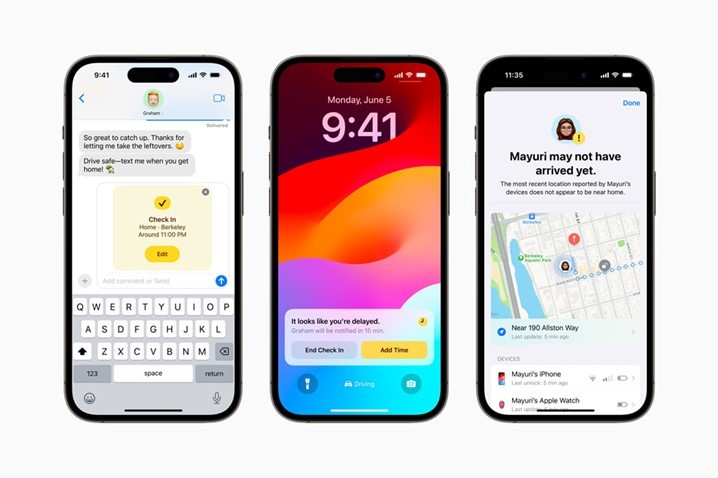
Location sharing in Messages has become simpler. When someone shares a location, it updates in real time within the conversation. This works alongside Check In, a safety feature that lets a friend or family member know you have arrived safely at your destination. When Check In is enabled, the people you are communicating with are notified if you reach your destination on time. If something goes wrong or the feature stops working, they can see your iPhone's location, battery percentage and connection status (whether there is sufficient signal) to determine whether you need help.
In iOS 17, Apple has improved autocorrect by adding a new model that can predict more accurately what you want to write. It can now offer automatic completion of entire sentences as you type, providing inline predictions that make completing a word or sentence quick and easy. Correcting mistakes is also easier, as you can do it with a simple tap.
On the Home Screen, widgets are now interactive, allowing you to use them to perform actions such as controlling music, switching on lights, marking a reminder as complete and much more. Spotlight search has also become more interactive, allowing you to perform actions such as changing settings without opening an app.
The Health app adds a mood-tracking feature, which lets you log your daily emotions to monitor your mental state over time. It will provide options for recording your mood and the factors that affect it.

In the Maps app, Apple has added the ability to use maps offline in selected areas. This gives you access to GPS, estimated arrival times and nearby locations even when you have no mobile signal.
As for Siri, you no longer need to say "Hey Siri" to activate it. Instead, you can simply say "Siri" and give consecutive commands without having to activate it each time. Note that the ability to activate Siri without saying "Hey" is limited to newer devices that support this feature.
Finally, Apple has stated that it has focused on improving performance and battery life with iOS 17. Optimisations have been made to the operating system's code to reduce power consumption and deliver an improved user experience.
These are some of the new features introduced by iOS17. There are many other smaller improvements and optimisations that enhance the overall experience of using the operating system. iOS17 promises to offer even more impressive capabilities and features for iPhone and iPad owners.




Share:
Android 14: Brings Battery Health to phones and tablets
WatchOS 10 brings the most significant upgrade to Apple Watch to date.